> ## Documentation Index
> Fetch the complete documentation index at: https://docs.creatify.ai/llms.txt
> Use this file to discover all available pages before exploring further.
# Overview (v1)
> API that converts text or audio files to vivid videos of people speaking.
🔁 We recommend upgrading to the `AI Avatar v2 API` for greater creative flexibility, including multi-scene composition, custom voices, backgrounds, and fine-grained control over captions and transitions.
## 🚀 Introduction
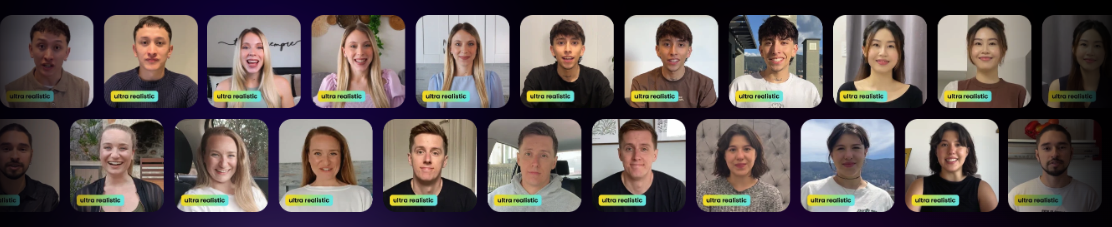
The **AI Avatar API** enables you to generate realistic, high-quality videos of virtual people speaking from any text or audio input. Whether you're building a marketing campaign, a product demo, or an educational assistant, this API offers an intuitive way to bring your content to life—powered by customizable personas and simple integration.
 ***
## ⚙️ Quickstart Guide
### ✅ Prerequisites
Before you begin, ensure you have:
* A [Creatify](https://app.creatify.ai) account with **API access**
* Your **API credentials** (see [Quickstart](/quickstart))
***
## 🧑🎤 Step 1: Choose a Persona
We offer **1500+ lifelike personas** with diverse styles and expressions to match your use case.
* Explore the full list here: [Get Personas API](/api-reference/personas/get-apipersonas/)
This API returns a list of available personas, each with a unique id field. Use the `id` of the selected persona as the `creator` parameter when generating your video.
***
## 📝 Step 2: Submit a Video Generation Request
Use this endpoint to generate a video of a person speaking from text.
```bash Example Request theme={null}
curl --request POST \
--url https://api.creatify.ai/api/lipsyncs/ \
--header 'Content-Type: application/json' \
--header 'X-API-ID: your-api-id' \
--header 'X-API-KEY: your-api-key' \
--data '{
"text": "hello world",
"creator": "18fccce8-86e7-5f31-abc8-18915cb872be",
"aspect_ratio": "9:16",
"model_version": "aurora_v1_fast"
}'
```
```json Example Response [expandable] theme={null}
{
"id": "4c0b2b3c-dcbb-4c12-8e98-a1e0643d5394",
"name": null,
"text": "hello world",
"creator": "18fccce8-86e7-5f31-abc8-18915cb872be",
"output": null,
"video_thumbnail": null,
"aspect_ratio": "9x16",
"green_screen": false,
"created_at": "2025-05-21T11:03:56.058716-07:00",
"updated_at": "2025-05-21T11:03:56.058742-07:00",
"credits_used": 0,
"progress": 0,
"failed_reason": null,
"media_job": null,
"status": "pending",
"is_hidden": false,
"audio_url": null,
"webhook_url": null,
"accent": null,
"preview": null,
"preview_audio": null,
"no_caption": true,
"no_music": true,
"caption_style": "normal-black",
"caption_offset_x": "0.00",
"caption_offset_y": "-0.40",
"background_asset_image_url": "https://app.creatify.ai/bg.jpg"
}
```
> ⚠️ Save the `id` — you'll need it to check the status.
***
## ⏳ Step 3: Check Video Generation Status
After submitting a video generation request, use the returned task ID to monitor progress and retrieve the completed video when it's ready.
```bash Example Request theme={null}
curl --request GET \
--url https://api.creatify.ai/api/lipsyncs/4c0b2b3c-dcbb-4c12-8e98-a1e0643d5394 \
--header 'X-API-ID: your-api-id' \
--header 'X-API-KEY: your-api-key'
```
```json Example Response [expandable] theme={null}
{
"id": "4c0b2b3c-dcbb-4c12-8e98-a1e0643d5394",
"name": null,
"text": "hello world",
"creator": "18fccce8-86e7-5f31-abc8-18915cb872be",
"output": "https://s3.us-west-2.amazonaws.com/remotionlambda-uswest2-30tewi8y5c/renders/t1evol64tg/output.mp4",
"video_thumbnail": "https://dpbavq092lwjh.cloudfront.net/amzptv/d58c6c38-4910-420d-b6a0-78402e2ebcaf-1747850651/thumbnail.jpg",
"aspect_ratio": "9x16",
"green_screen": false,
"created_at": "2025-05-21T11:03:56.058716-07:00",
"updated_at": "2025-05-21T11:04:11.533648-07:00",
"credits_used": 5,
"progress": 1,
"failed_reason": null,
"media_job": "d58c6c38-4910-420d-b6a0-78402e2ebcaf",
"status": "done",
"is_hidden": false,
"audio_url": null,
"webhook_url": null,
"accent": null,
"preview": "https://app.creatify.ai/preview?layout=videos/20250521/3b7957ea-0efd-42df-90de-bd3e1ea3b451.json",
"preview_audio": "https://d35ghwdno3nak3.cloudfront.net/user/18165/2025-05-21/af7e-req-xUnTEy7jObxDLiRum8wh-0-s.mp3",
"no_caption": true,
"no_music": true,
"caption_style": "normal-black",
"caption_offset_x": "0.00",
"caption_offset_y": "-0.40",
"background_asset_image_url": "https://app.creatify.ai/bg.jpg"
}
```
> ⏳ Once the `status` is `done`, download the video from the `output` field.
***
## 🎯 Summary
| Step | Endpoint |
| ------------- | ------------------------------------------------------------------- |
| List Personas | `GET /api/personas/` |
| Create Task | `POST /api/lipsyncs/` |
| Check Status | `GET /api/lipsyncs/{id}/` |
| API Reference | [AI Avatar API Reference](/api-reference/lipsyncs/post-apilipsyncs) |
***
## 🤝 Need Help?
If you run into any issues, check out our [API Reference](/api-reference) or contact [api@creatify.ai](mailto:api@creatify.ai).
***
## ⚙️ Quickstart Guide
### ✅ Prerequisites
Before you begin, ensure you have:
* A [Creatify](https://app.creatify.ai) account with **API access**
* Your **API credentials** (see [Quickstart](/quickstart))
***
## 🧑🎤 Step 1: Choose a Persona
We offer **1500+ lifelike personas** with diverse styles and expressions to match your use case.
* Explore the full list here: [Get Personas API](/api-reference/personas/get-apipersonas/)
This API returns a list of available personas, each with a unique id field. Use the `id` of the selected persona as the `creator` parameter when generating your video.
***
## 📝 Step 2: Submit a Video Generation Request
Use this endpoint to generate a video of a person speaking from text.
```bash Example Request theme={null}
curl --request POST \
--url https://api.creatify.ai/api/lipsyncs/ \
--header 'Content-Type: application/json' \
--header 'X-API-ID: your-api-id' \
--header 'X-API-KEY: your-api-key' \
--data '{
"text": "hello world",
"creator": "18fccce8-86e7-5f31-abc8-18915cb872be",
"aspect_ratio": "9:16",
"model_version": "aurora_v1_fast"
}'
```
```json Example Response [expandable] theme={null}
{
"id": "4c0b2b3c-dcbb-4c12-8e98-a1e0643d5394",
"name": null,
"text": "hello world",
"creator": "18fccce8-86e7-5f31-abc8-18915cb872be",
"output": null,
"video_thumbnail": null,
"aspect_ratio": "9x16",
"green_screen": false,
"created_at": "2025-05-21T11:03:56.058716-07:00",
"updated_at": "2025-05-21T11:03:56.058742-07:00",
"credits_used": 0,
"progress": 0,
"failed_reason": null,
"media_job": null,
"status": "pending",
"is_hidden": false,
"audio_url": null,
"webhook_url": null,
"accent": null,
"preview": null,
"preview_audio": null,
"no_caption": true,
"no_music": true,
"caption_style": "normal-black",
"caption_offset_x": "0.00",
"caption_offset_y": "-0.40",
"background_asset_image_url": "https://app.creatify.ai/bg.jpg"
}
```
> ⚠️ Save the `id` — you'll need it to check the status.
***
## ⏳ Step 3: Check Video Generation Status
After submitting a video generation request, use the returned task ID to monitor progress and retrieve the completed video when it's ready.
```bash Example Request theme={null}
curl --request GET \
--url https://api.creatify.ai/api/lipsyncs/4c0b2b3c-dcbb-4c12-8e98-a1e0643d5394 \
--header 'X-API-ID: your-api-id' \
--header 'X-API-KEY: your-api-key'
```
```json Example Response [expandable] theme={null}
{
"id": "4c0b2b3c-dcbb-4c12-8e98-a1e0643d5394",
"name": null,
"text": "hello world",
"creator": "18fccce8-86e7-5f31-abc8-18915cb872be",
"output": "https://s3.us-west-2.amazonaws.com/remotionlambda-uswest2-30tewi8y5c/renders/t1evol64tg/output.mp4",
"video_thumbnail": "https://dpbavq092lwjh.cloudfront.net/amzptv/d58c6c38-4910-420d-b6a0-78402e2ebcaf-1747850651/thumbnail.jpg",
"aspect_ratio": "9x16",
"green_screen": false,
"created_at": "2025-05-21T11:03:56.058716-07:00",
"updated_at": "2025-05-21T11:04:11.533648-07:00",
"credits_used": 5,
"progress": 1,
"failed_reason": null,
"media_job": "d58c6c38-4910-420d-b6a0-78402e2ebcaf",
"status": "done",
"is_hidden": false,
"audio_url": null,
"webhook_url": null,
"accent": null,
"preview": "https://app.creatify.ai/preview?layout=videos/20250521/3b7957ea-0efd-42df-90de-bd3e1ea3b451.json",
"preview_audio": "https://d35ghwdno3nak3.cloudfront.net/user/18165/2025-05-21/af7e-req-xUnTEy7jObxDLiRum8wh-0-s.mp3",
"no_caption": true,
"no_music": true,
"caption_style": "normal-black",
"caption_offset_x": "0.00",
"caption_offset_y": "-0.40",
"background_asset_image_url": "https://app.creatify.ai/bg.jpg"
}
```
> ⏳ Once the `status` is `done`, download the video from the `output` field.
***
## 🎯 Summary
| Step | Endpoint |
| ------------- | ------------------------------------------------------------------- |
| List Personas | `GET /api/personas/` |
| Create Task | `POST /api/lipsyncs/` |
| Check Status | `GET /api/lipsyncs/{id}/` |
| API Reference | [AI Avatar API Reference](/api-reference/lipsyncs/post-apilipsyncs) |
***
## 🤝 Need Help?
If you run into any issues, check out our [API Reference](/api-reference) or contact [api@creatify.ai](mailto:api@creatify.ai).